Axxess Hospice now provides an “Other” option under Code Status on the Advance Directives tab in each patient’s chart. Users can select this option to expand a text box where a custom code status can be entered. Custom code statuses entered through the “Other” option will appear at the top of the patient’s chart, on the Code Status widget on the Patients Dashboard, and on the Advance Directives Report for seamless tracking and management. This enhancement facilitates compliance with state requirements that mandate the use of specific code statuses.
To edit a patient’s code status, users must have permission to view and edit patient charts in Axxess Hospice.
To give a user permission to view and edit patient charts, edit the user’s profile and navigate to the Permissions tab. In the Clinical section, select View and Edit next to the Patient Charts permission. Click Save to finish granting the permissions to the user.
People tab ➜ People Center ➜ Edit ➜ Permissions tab ➜ Clinical section ➜ Patient Charts ➜ View/Edit ➜ Save

To edit a patient’s code status, edit the patient’s chart and navigate to the Advance Directives tab. In the Advance Directives section, select Other under Code Status.
Patients tab ➜ Patient Charts ➜ Edit Profile ➜ Advance Directives tab ➜ Advance Directives section ➜ Code Status ➜ Other
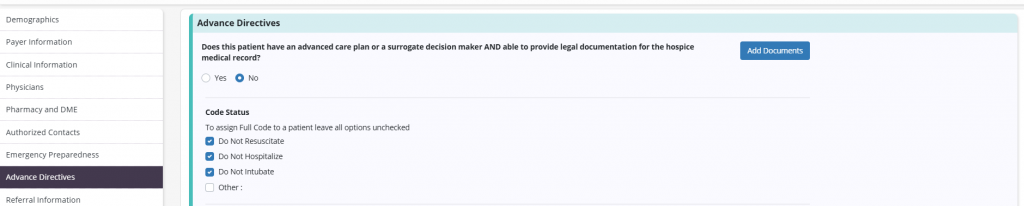
When Other is selected, a text box will appear. Enter the desired code status name. You may enter up to 15 characters.
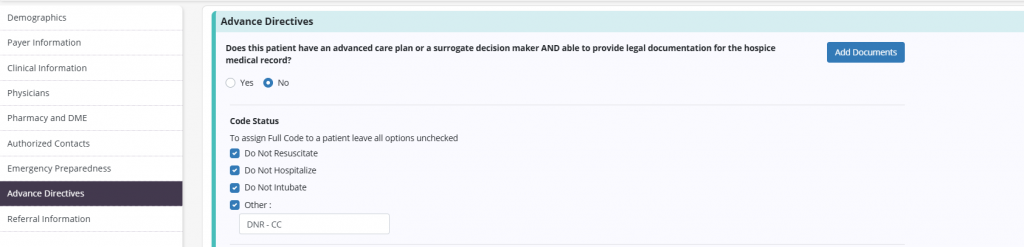
Select Save at the bottom of the patient’s profile.
Once the patient profile is saved, the text entered in the above box will appear as a red pill at the top of the patient’s chart.

Code statuses entered through the Other option will be included in the Code Status widget on the Patients Dashboard. To access this widget, navigate to the Patients tab and select Patients Dashboard.
Patients tab ➜ Patients Dashboard ➜ Code Status widget

Select Other on the Code Status widget to open the Advance Directives Report filtered to all Other code statuses.

Updated on 12/09/2025
