Below are key field descriptions for Version 3.02 (E2) of the OASIS data specifications effective April 1, 2026. Non-key fields are all other fields making up the OASIS data set that are not key fields.
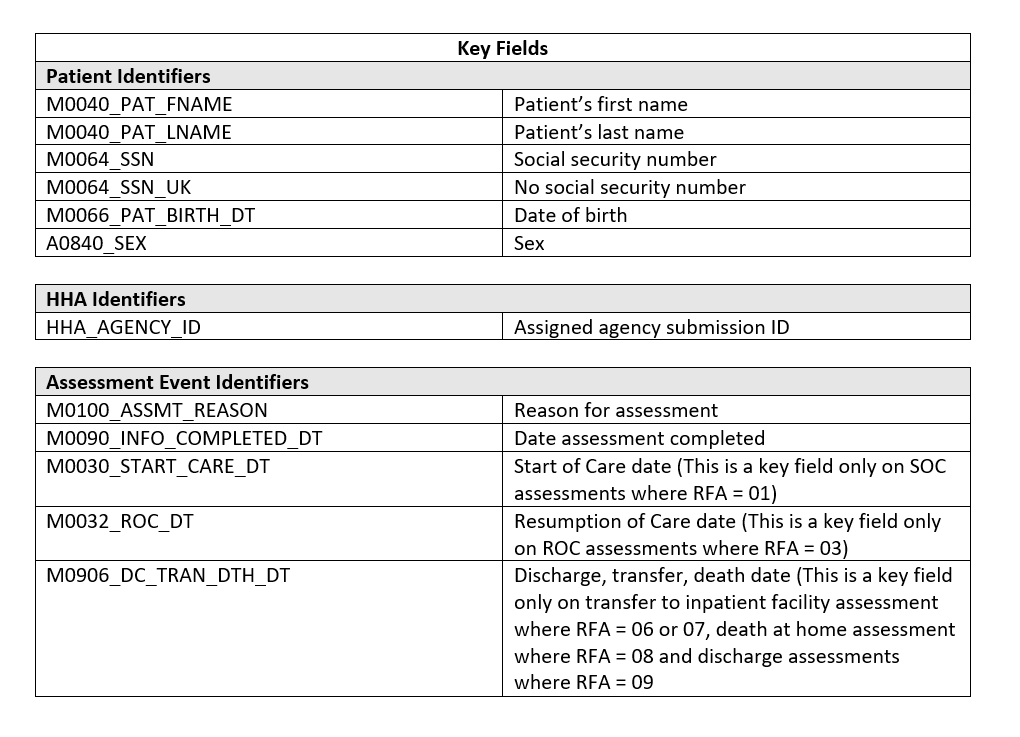
HHAs may electronically correct errors in both key and non-key fields in production records and also remove erroneous records using an automated methodology called inactivation. With the ability to inactivate erroneous OASIS assessments, as described below, HHAs will be able to remove assessments from the state system’s active database that have been submitted in error. These records are not actually deleted, but are moved from the active database to a history database that contains records that have been modified or inactivated. This approach keeps an audit trail of modified and inactivated records, but “hides” them from he normal state system reporting procedures.
Determining When to Inactivate an Assessment
If an error has been made in one or more key fields, or if an assessment was submitted in error, the HHA will no longer need to notify the state OASIS automation coordinator. The erroneous assessment can and should be inactivated by the HHA. The inactivation procedure should be used if it is necessary to correct an assessment with errors in key fields. Use of the inactivation procedure is not applicable to correcting assessments with only non-key field errors. In other words, if an assessment contains errors in only non-key fields, then correction type 2 listed below should be used.
If corrections are Key Field areas the OASIS assessment will need to be inactivated or canceled, open the assessment, make the necessary corrections and export again.
If corrections are Non-Key Field areas then the open the assessment, make the corrections and when generating the export file, make sure the correction number is changed from 00 to 01.
For complete details on making OASIS corrections refer to the OASIS Correction Policy from CMS.
