Axxess Home Health now enables users to load previous OASIS and non-OASIS assessments across disciplines. This enhancement streamlines operations, provides ease of use and reduces the documentation burden.
Users must have permission to manage company information to load a previous assessment.
To load previous settings, navigate to Company Setup under the Admin tab and click Clinical.
Admin tab ➜ Company Setup ➜ Clinical
In the Load Previous Settings section, select Enable under OASIS – Load Previous Across Discipline and Non-OASIS – Load Previous Across Discipline and click Submit Request.

Once enabled, users will see the assessments completed within the past four to six months, regardless of discipline.
To load a previously documented assessment into your current one, navigate to the Demographics tab. Select the assessment from the Load Previous Assessment section and click Load Assessment. Confirm your selection by selecting Continue.

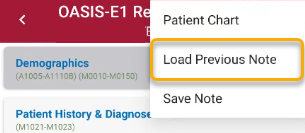
To load a previously documented assessment from a mobile device, select the ellipsis icon in the top-right corner and click Load Previous Note.
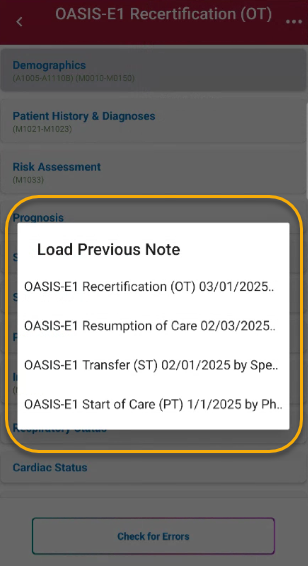
Select the desired assessment to load and click Continue.
Updated on 01/22/2026
No related posts.
