Axxess Home Care now includes an Unpaid Tasks report that enables users to track outstanding tasks within a selected date range. By improving visibility into unpaid tasks, this report supports more efficient task management and streamlines operations.
To generate the report, users must have access to the Unpaid Tasks report in Axxess Home Care.
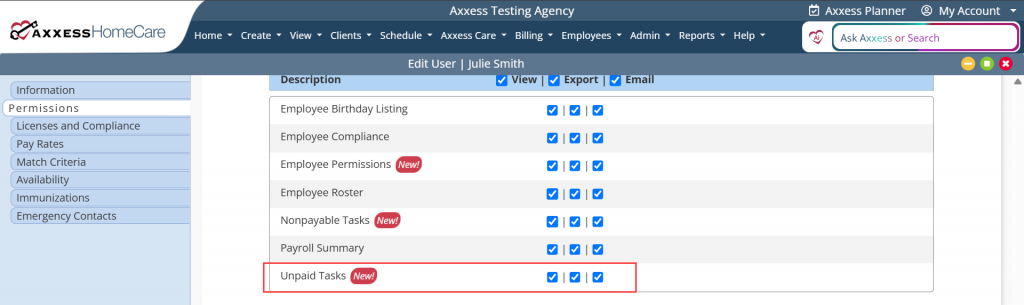
To give a user permission to access the Unpaid Tasks report, navigate to the employee’s profile and select Permissions from the Quick Links menu. In the Reports section, navigate to the Employee Reports section and select the checkboxes next to Unpaid Tasks. Click Save to finish granting the permissions to the user.
Employees tab ➜ Employee Center ➜ Quick Links ➜ Permissions ➜ Reports section ➜ Employee Reports ➜ Unpaid Tasks ➜ Save
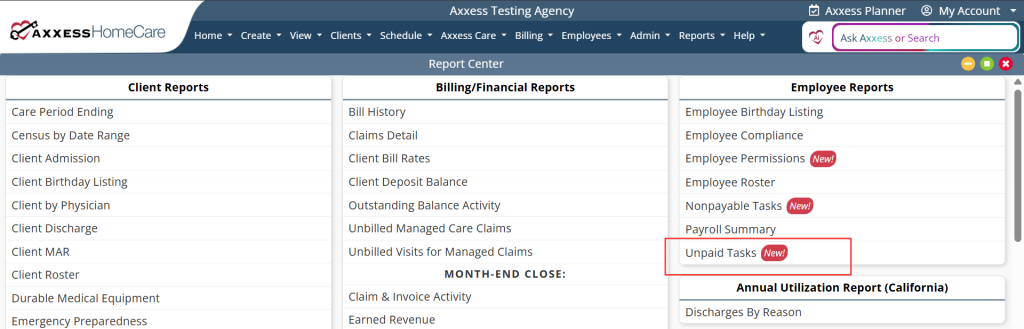
To generate the Unpaid Tasks report, navigate to the Report Center under the Reports tab. In the Employee Reports section, select Unpaid Tasks.
Reports tab ➜ Report Center ➜ Employee Reports ➜ Unpaid Tasks
The report can be filtered by Branches, Employee Status, Employees, Tasks, and Date Range. Once the desired parameters have been selected, click Generate.
The solution will alert you through the Message Center when the report has finished generating. To view the report, navigate to the Reports tab and select Completed Reports. Click the report name to download an excel file of the report.
Updated on 08/12/2026
No related posts.