The following functionality is coming soon to Axxess Home Care. Axxess will alert you when this feature is available. Check your messages in Axxess Home Care for important alerts from Axxess.
Axxess Home Care now enables organizations to assign credential requirements to tasks in Company Setup. This enhancement ensures that only employees with the required credentials can be scheduled for specific tasks, supporting operational efficiency and compliance requirements.
To enable credential-based scheduling, users must have permission to edit Company Setup in Axxess Home Care.
To give a user permission to edit Company Setup, navigate to the employee’s profile in the Employee Center and select Permissions from the Quick Links menu. In the Administration section, expand the Agency permissions section, expand it and select the checkbox next to Edit. Select Save to finish granting permissions to the user.
Employees tab ➜ Employee Center ➜ Quick Links menu ➜ Permissions ➜ Administration ➜ Agency ➜ Edit ➜ Save
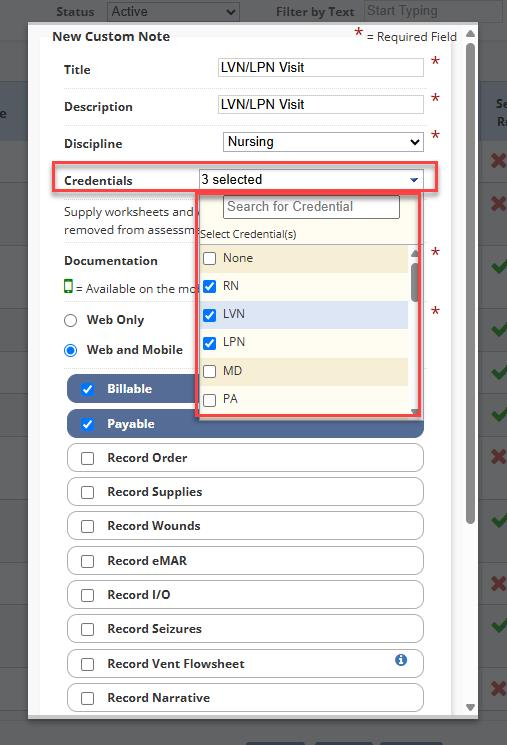
To assign credentials to tasks, navigate to the Admin tab and select Company Setup from the drop-down menu. Select the Document Management tab and select New to create a new task or select Edit under the Actions column to edit an existing task.
Once selected, a new Credentials field is displayed. The field is optional and supports multiple selections. If no credentials are selected, any employee can be scheduled for the task. After selecting the appropriate credentials, select Save.
After saving, if the selected task has credential requirements defined in Company Setup, only employees with the required credentials will be displayed as available scheduling options.
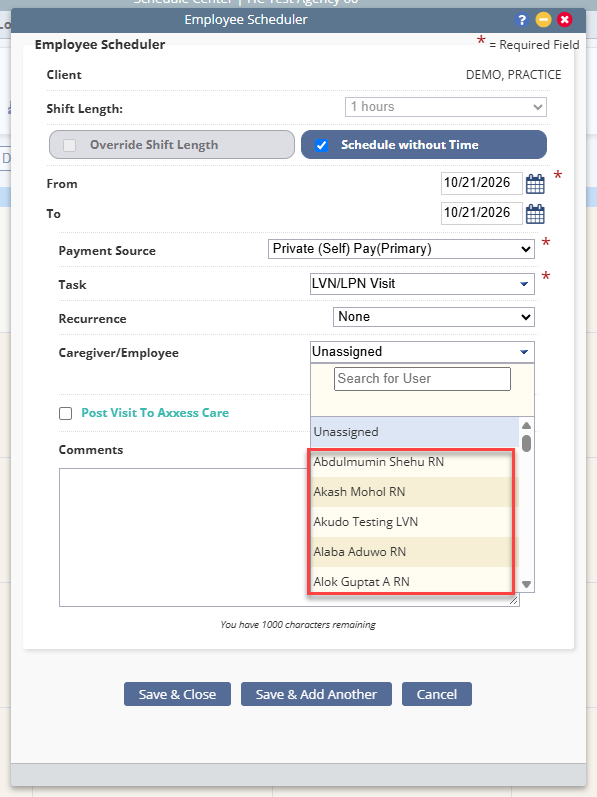
Credential requirements are also enforced when rescheduling a task or using the Find a Match feature.