Axxess Home Care now enables users to document supervisor follow‑ups directly within Client Infection Logs. A new Supervisor Follow‑Up section has been added to the Client Infection Log screen, enabling teams to record and track follow‑up actions for client infections more efficiently. This enhancement facilitates compliance and streamlines client care coordination.
To access the new section, users must have permission to document supervisor follow-ups in Axxess Home Care.
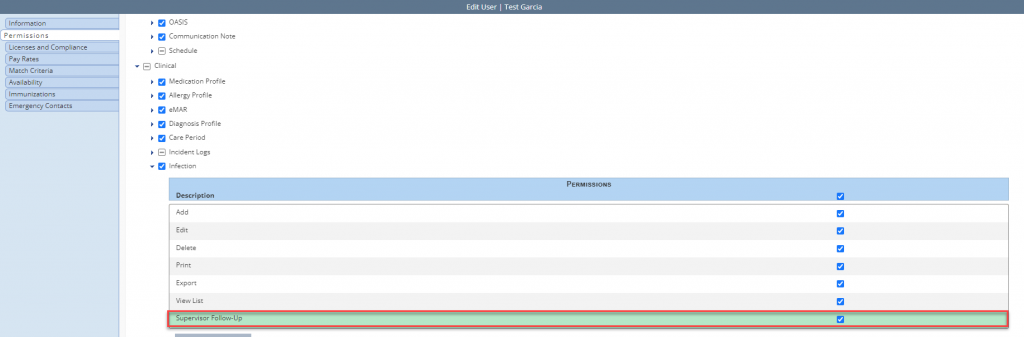
To give a user permission to add a supervisor follow-up, navigate to the employee’s profile and select Permissions from the Quick Links menu. In the Clinical section, navigate to the Infection section and select the checkbox next to Supervisor Follow-Up. Click Save to finish granting the permissions to the user.
Employees tab ➜ Employee Center ➜ Quick Links ➜ Permissions ➜ Clinical section ➜ Infection ➜ Supervisor Follow-Up ➜ Save
To create an infection log for a client, navigate to the Create tab and select Infection Log.
Create tab ➜ Infection Log
On the Infection Log screen, select the desired client by entering at least three characters to search, then complete the remaining required fields.
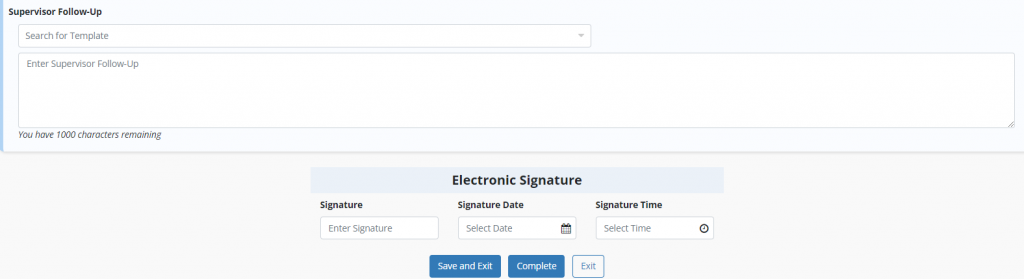
Once the remaining information has been entered, select the Add Supervisor Follow‑Up button to document a supervisor follow‑up.

Enter the supervisor follow‑up details in the Supervisor Follow‑Up section, then enter the signature along with the signature date and time. Select Complete to finish.
To add a supervisor follow-up to an existing infection log, navigate to the View tab, hover over Lists and select Infection Logs. Then navigate to the desired log, select the edit icon under Actions and select Add Supervisor Follow-Up on the Client Infection Logs screen.
View tab ➜ Lists ➜ Infection Logs ➜ Desired Infection Log ➜ Actions ➜ Edit ➜ Add Supervisor Follow-Up

When printed, client infection logs will display the name and signature of the user who documented the infection as well as the name and signature of the user who completed the supervisor follow-up.

Updated on 05/20/2026
