Axxess Home Care now enables users to select Viventium as a payroll vendor, streamlining operations for organizations using Viventium by ensuring accurate data transfer and supporting proper employee pay mapping and control.
Organizations must set up pay codes and rule sets when using Viventium as their payroll vendor.
To create pay codes and rule sets, users must have permission to view and export payroll lists, as well as edit Company Setup in Axxess Home Care.
To give a user permission to view and export payroll lists, navigate to the employee’s profile in the Employee Center and select Permissions from the Quick Links menu. In the Administration section, expand the Payroll permissions and select the checkboxes next to the Export and View List permissions.
Employees tab ➜ Employee Center ➜ Quick Links menu ➜ Permissions ➜ Administration ➜ Payroll ➜ Export ➜ View List
To give a user permission to edit Company Setup, navigate to the Agency permissions section, expand it and select the checkbox next to Edit. Select Save to finish granting permissions to the user.
Agency ➜ Edit ➜ Save
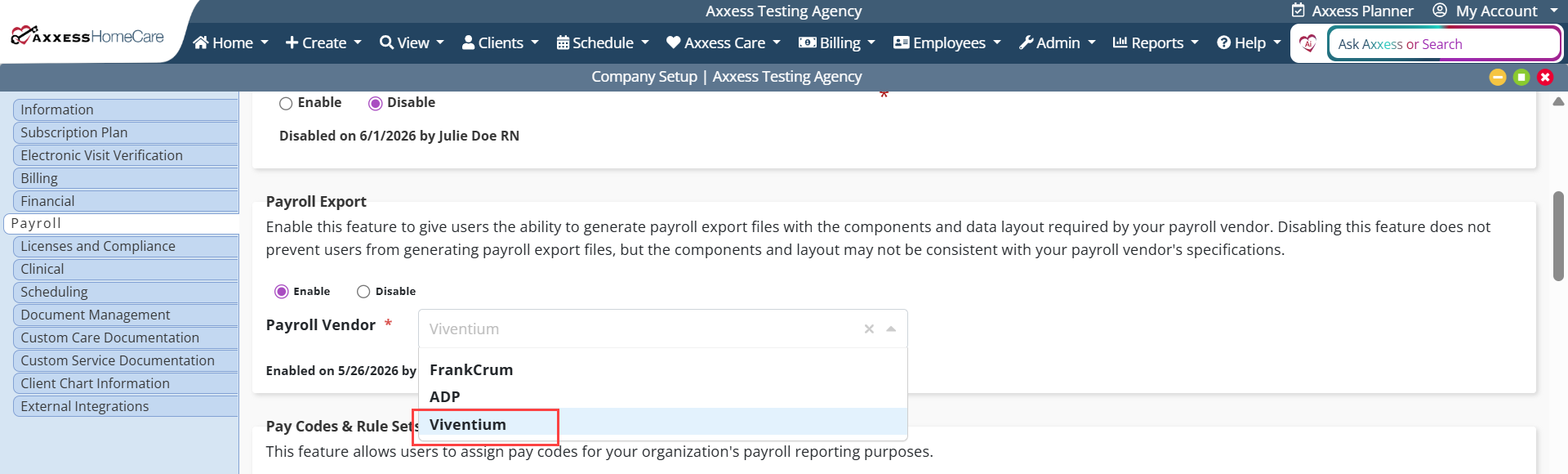
To select Vivtentium as your payroll vendor, navigate to Company Setup under the Admin tab and click Payroll. In the Payroll Export section, select Viventium from the Payroll Vendor drop-down menu.
Admin tab ➜ Company Setup ➜ Payroll tab ➜ Payroll Export section ➜ Payroll Vendor ➜ Viventium
Updated on 06/17/2026
No related posts.
