Axxess Home Care now provides a ProviderOne Export Report for users in Washington using ProviderOne as their EVV aggregator. The addition of this report streamlines operations and facilitates compliance by providing organizations with the required EVV data elements needed to achieve a fully compliant status for EVV compliance rate calculations.
To generate the ProviderOne Export Report in Axxess Home Care, organizations must add ProviderOne as an EVV vendor in Company Setup and have access to the ProviderOne Export Report.
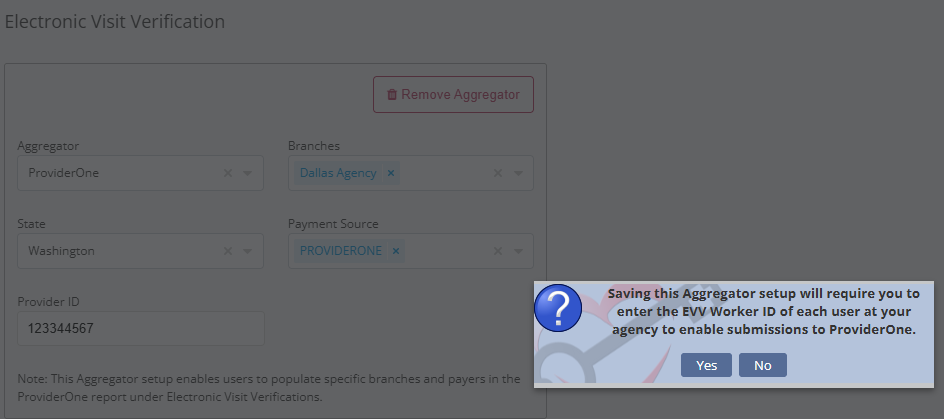
To add ProviderOne as an EVV aggregator, navigate to the Admin tab and select Company Setup from the drop-down menu. On the Electronic Visit Verification tab, select Add Aggregator, enter the required information and click Save.
Admin tab ➜ Company Setup ➜ Electronic Visit Verification tab ➜ Add Aggregator ➜ Save
Once selected, a pop up will display, indicating that the EVV Worker ID must now be entered in each employee’s profile to complete submissions to ProviderOne.
To add the EVV Worker ID to the required users, navigate to the desired employee’s profile and select Edit. Once selected, click the Information tab and navigate to the EVV Worker ID field to enter the required information. Click Save to complete.

To give a user permission to access the ProviderOne Export Report in Axxess Home Care, navigate to the employee’s profile and select Permissions from the Quick Links menu. In the Reports section, navigate to Electronic Visit Verification Reports and select the permissions next to ProviderOne Export Report. Click Save to finish granting the permissions to the user.
Employees tab ➜ Employee Center ➜ Quick Links ➜ Permissions ➜ Reports ➜ Electronic Visit Verification Reports ➜ ProviderOne Export Report ➜ Save

To generate the ProviderOne Export Report, navigate to the Report Center under the Reports tab. In the Electronic Visit Verification Reports section, select ProviderOne Export Report.
Select the desired parameters at the top of the screen and click Generate.
The system will alert you through the Message Center when the report has finished generating. To view the report, navigate to the Reports tab and select Completed Reports.
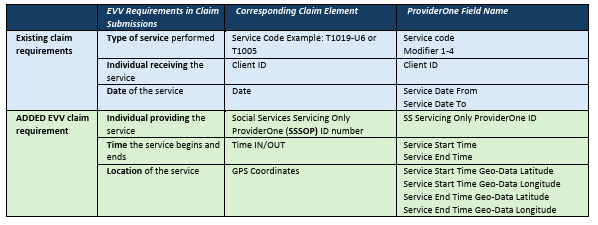
The ProviderOne Export Report now includes the three required EVV data elements for compliance rate calculation.

Updated on 07/08/2026