Axxess Home Care now automatically fills in the clinician’s signature date and time when documentation is completed. This enhancement ensures compliance by preventing incorrect times or dates on signed documents.
To enable autofill signature date and time, navigate to Company Setup under the Admin tab. On the Clinical tab, click Enable under Autofill Signature Date and Time and select Save.
Admin tab ➜ Company Setup ➜ Clinical tab ➜ Autofill Signature Date and Time section ➜ Enable ➜ Save

Once enabled, the time and date the user signed the document will automatically fill in the Signature Date and Signature Time fields. The fields cannot be edited. Select Complete to continue.
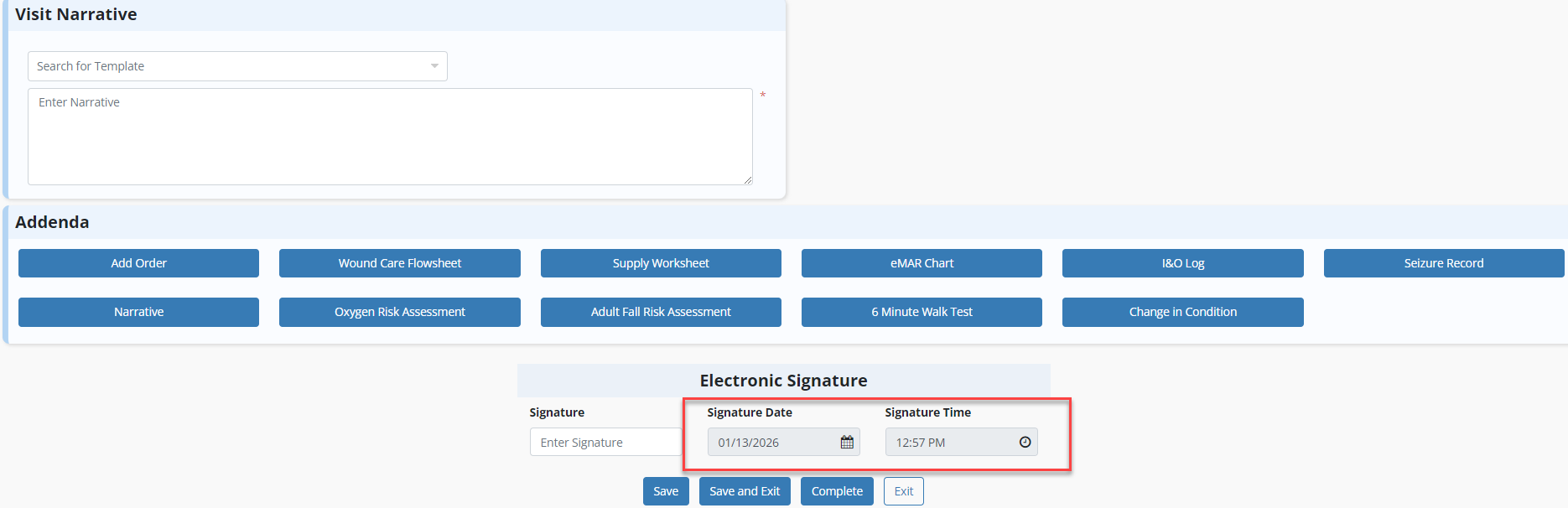
This enhancement automatically fills in the clinician’s signature date and time on any notes that require a signature, whether accessed via a web browser or the mobile application.
Updated on 02/19/2026
No related posts.
