The following functionality is coming soon to Axxess Palliative Care. Axxess will alert you when this feature is available. Check your messages in Axxess Palliative Care for important alerts from Axxess.
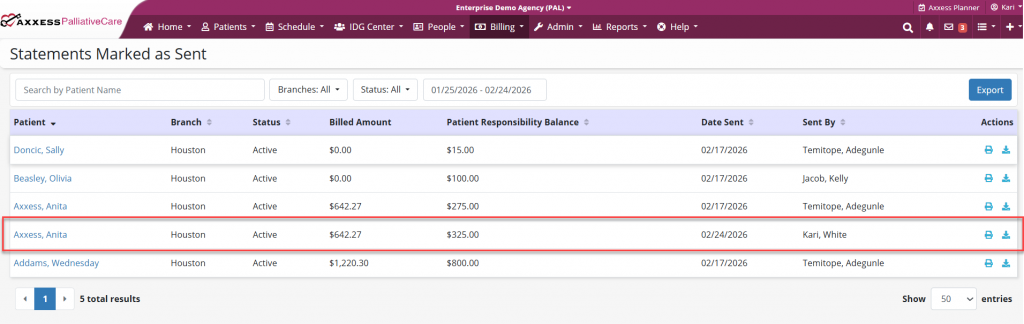
Axxess Palliative Care now enables users to view and download a billing statement once it has been marked as sent on the Statements screen. This enhancement streamlines billing operations by providing organizations quick access to view, print or download statements previously sent to patients.
To access statement histories, users must have permission to view and edit statements in Axxess Palliative Care.
To give a user permission to view and edit statements, edit the user’s profile and navigate to the Permissions tab. In the Billing section, select View and Edit next to the Statements permission. Click Save to finish granting the permissions to the user.
People tab ➜ People Center ➜ Edit ➜ Permissions tab ➜ Billing section ➜ Statements ➜ View/Edit ➜ Save

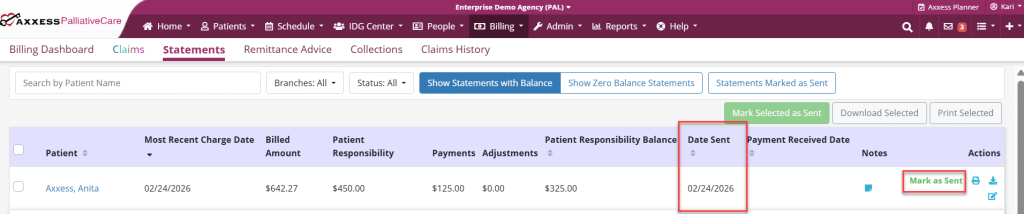
To view and download statements that have been marked as sent, users must first indicate that a statement has been printed and mailed to the patient. To mark a statement as sent, navigate to the Billing tab and select Statements from the drop-down menu. Under the Actions column, select Mark as Sent. The most recent marked as sent date will appear in the Date Sent column.
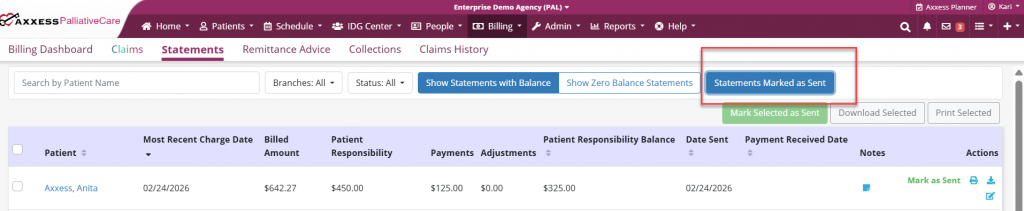
Once the statement is marked as sent, it will be saved in the solution for future retrieval. To view, print or download the statement, select the Statements Marked as Sent button at the top of the screen.
Once selected, the Statements Marked as Sent screen will open. Here, statements can be filtered by patient name, branch, status and date range. Once the desired statement has been located, select the print or download icon in the Actions column to print or download the statement.